macOS right-click actions
Your macOS right-click menu, supercharged.
Upload files to Google Drive, convert to PDF, compress videos, or run AI actions with ChatGPT, Gemini, and Claude — from the menus you already use.
- Select one or more files in Finder
- Right-click and open the Quick Actions menu
- Choose an action: Upload to Drive, Analyze with AI, Convert to PDF, or Compress Video
Works anywhere Finder shows Quick Actions — Desktop, Downloads, AirDrop, and more. Select text in any app to run AI actions (analyze, translate, look up definitions, summarize, explain, grammar check) via the system Services menu.
Be among the first to experience QuiKey
Built into the tools you already use
QuiKey installs 6 Finder actions and 18 selected-text actions as native macOS Services. AI chats and squads are available inside the app.
Finder (files & folders)
Right-click in Finder → Quick Actions / Services
- Upload to DriveUpload selected items to Google Drive.
- Analyze with ChatGPTSend files to ChatGPT for analysis.
- Analyze with GeminiSend files to Gemini for analysis.
- Analyze with ClaudeSend files to Claude for analysis.
- Convert to PDFConvert selected items to PDF.
- Compress videoReduce size of videos and GIFs.
Any app (selected text)
Select text → right-click → Services
- AnalyzeExtract meaning and key points.
- SummarizeShort summary of selected text.
- ExplainClarify and break down content.
- TranslateTo your configured target language.
- DefineDefinitions and context.
- Grammar checkFix grammar and style.
Providers: ChatGPT, Gemini, Claude.
Inside the app
Chats, squads, history, stats, settings
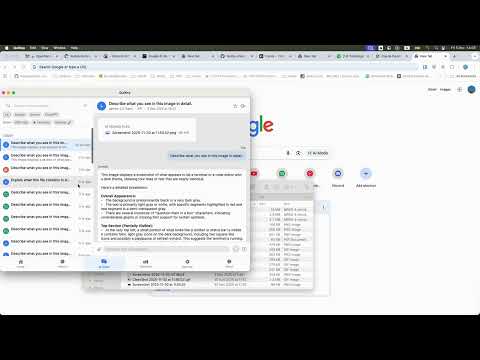
- AI ChatsConversations with follow-ups, local history, and exports.
- AI SquadsMulti-step workflows across multiple providers.
- OpenRouter modelsAccess a large catalog of models inside the app.
- TemplatesBuilt-in prompts; Pro unlocks custom templates and branding removal.
- History & statisticsReopen results, view usage, export reports/CSV.


What you can do
Upload to Google Drive
Right-click in Finder to upload files to Drive. Files land in a dedicated QuiKey folder.
Analyze files with AI
Right-click files in Finder to analyze with ChatGPT, Gemini, or Claude.
Convert to PDF
Convert files to PDF quickly, with options like password protection and an optional cloud fallback.
Compress video & GIFs
Reduce the size of large videos and animated GIFs for easier sharing.
AI actions for selected text
Select text in any app and run AI actions: analyze, translate, look up definitions, summarize, explain, and grammar check.
AI Chats
Chat with AI using your files — ask questions, follow up, and keep a local conversation history.
AI Squads
Run multi-step workflows where multiple AI providers collaborate, compare, and synthesize results into one output.
OpenRouter models
Choose from a large catalog of models inside QuiKey for chats and squads.
Templates
Use built-in prompt templates across providers. Pro unlocks custom templates and branding removal.
History & statistics
Track what you ran, reopen results, filter by provider, and view usage statistics inside the app.
Secure by design
Credentials and API keys are stored encrypted on your Mac. You can opt out of usage analytics.
Pricing
Start with a free trial. Upgrade to Pro for unlimited usage and customization.
- Monthly operation limit
- Up to 5 files per action
- No custom templates
- Branding included
- Unlimited operations
- Unlimited files per action
- Custom templates
- Remove branding
- Priority support
Pro checkout is rolling out during early access. Join the waitlist and we’ll invite you when billing is enabled.
How it Works
Right-Click
On files in Finder or on selected text
Choose Action
Drive, AI analysis, PDF conversion, compression, or text actions
Done
Get a notification when it's complete
Get Early Access
Join the QuiKey Waitlist
We're carefully onboarding early users to ensure the best experience. Sign up now to secure your spot and get exclusive benefits.
Early Access includes:
- Priority onboarding - we’ll invite you as we expand access
- Direct feedback loop - help shape what ships next
- Early builds - get updates as new actions land
Have questions? Email us at info@quikey.app
System Requirements
- macOS 13.0 or later
- Google account for Drive access
- Internet connection
What happens next?
- We'll review your request
- You'll receive an invite email
- Download and start using QuiKey
- Share feedback to help us improve
Frequently Asked Questions
Is my data secure?
Yes. Google access uses OAuth 2.0, and API keys/tokens are stored encrypted on your Mac. Files go directly to the providers you choose (Google, AI providers, etc.).
Where do the actions appear?
File actions appear in Finder’s right-click menu (Quick Actions/Services). Text actions appear when you select text in any app and use the system Services menu.
Why don’t I see the actions in right-click?
macOS requires enabling Services manually. QuiKey links you there, or go to System Settings → Keyboard → Keyboard Shortcuts → Services and enable the QuiKey actions you want.
What file types are supported?
For Drive, you can send any file type. PDF conversion and AI analysis depend on the action and provider, and QuiKey will guide you if a file is unsupported.
What AI modes are supported?
QuiKey supports API keys, browser mode (where supported), and Claude CLI subscription mode. Choose per provider in Settings → AI Providers.
Is there a cost?
QuiKey includes a free trial and an optional Pro upgrade (unlimited operations, unlimited files per action, custom templates, and more).
Is everything triggered from right-click?
The file and text actions are. Features like AI Squads, AI Chats, history, and statistics live inside the app.
Can I disable analytics?
Yes. You can disable usage metrics in Settings at any time.